Billing Settings
After enabling a subscription, configure the billing details inside the Subscription Settings card on each product variation.
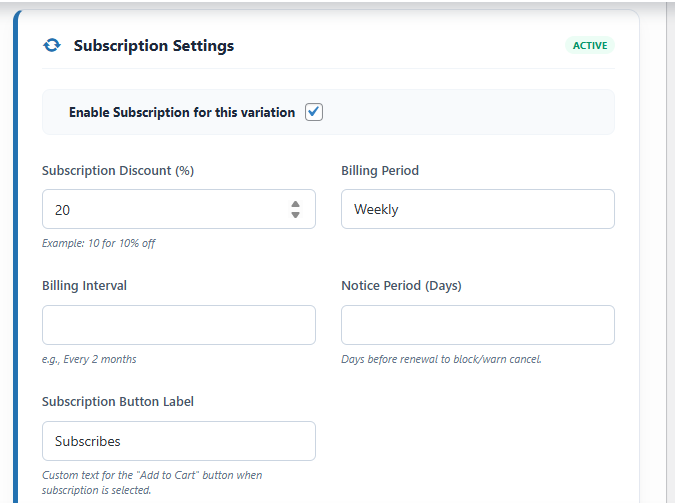
Field Reference
| Field | Description | Example |
|---|---|---|
| Subscription Discount (%) | Percentage reduction applied to the regular price for subscribers. Enter 0 to charge the same as the one-time price. | 10 → 10% off the regular price |
| Billing Period | The unit of time for the billing frequency. | Day, Week, Month, Year |
| Billing Interval | How many billing periods pass between renewals. | 2 with Period "Week" = every 2 weeks |
| Notice Period (Days) | Days before the next renewal within which a cancellation request is blocked or warned. See Notice Period. | 7 = no cancel within 7 days of renewal |
Common Billing Configurations
| Goal | Period | Interval | Result |
|---|---|---|---|
| Monthly | Month | 1 | Charged every month |
| Bi-Monthly | Month | 2 | Charged every 2 months |
| Quarterly | Month | 3 | Charged every 3 months |
| Annual | Year | 1 | Charged every year |
| Bi-Weekly | Week | 2 | Charged every 2 weeks |
| Daily (Testing) | Day | 1 | Charged every day |
How the Discount Appears
When a customer selects the "Subscribe & Save" option on the product page, the displayed price automatically updates to reflect the subscription discount in real-time — no page reload required.
📌 Example: Regular price $50.00, Discount 10% → Subscription price shown as $45.00 / month.
💡 Tip: Setting Discount to
0 is valid if you simply want recurring billing at the same price without a discount incentive.