Enable Subscription on a Product
Moiz Subscriptions works at the variation level, meaning you can offer a subscription option on any specific variation of a variable product without affecting other variations.
Step-by-Step Guide
From your WordPress dashboard, go to Products → All Products.
Click Edit on any product that has variations (i.e., a Variable Product type). Simple products do not support variations.
Scroll down to the Product Data meta box and click on the Variations tab in the left sidebar of that panel.
Click on any variation row (e.g., Variation #123 — Small / Blue) to expand its settings panel.
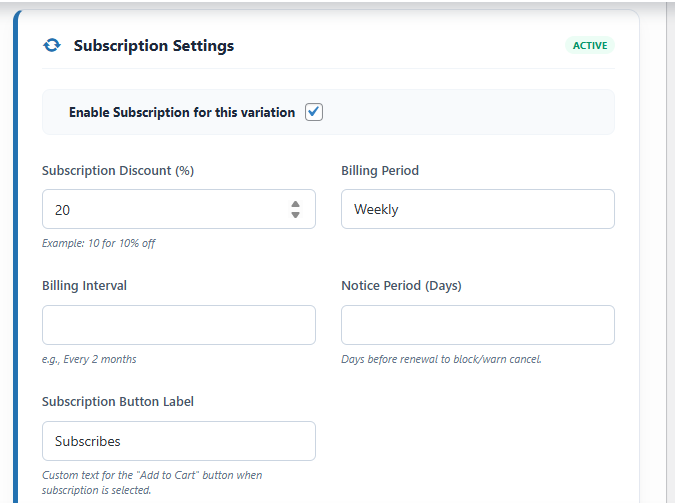
Scroll to the bottom of the expanded variation. You will see a blue-bordered card labeled Subscription Settings.
Tick the "Enable Subscription for this variation" checkbox. This activates the "Subscribe & Save" toggle on the product page for this specific variation.
Click the Save Changes button at the bottom of the page, or use the main Update button at the top right.
Visit the product page and select the variation you just configured. You should see the Subscribe & Save toggle box appear above the "Add to Cart" button.
Product Variation Subscription Settings
Location: Edit Product > Variations > [Expand Variation] > Subscription Settings Card
This is where you enable subscription features for specific product variations.
- Enable Subscription: Toggle to turn a variation into a subscription product.
- Subscription Discount: Set a percentage discount (e.g., 10%) compared to the one-time price.
- Billing Period & Interval: Define how often the customer is charged (e.g., Every 1 Month, Every 2 Weeks).
- Notice Period (Days): Block or warn customers about cancellation if they try to cancel close to the renewal date.
- Subscription Button Label: Customize the "Add to Cart" button text specifically for when this subscription variation is selected.
- Frequency Rules: Define advanced multiple frequency options for a single variation.
Next Steps
Once enabled, configure the billing frequency and discount. See Billing Settings for a complete guide to all subscription fields.